
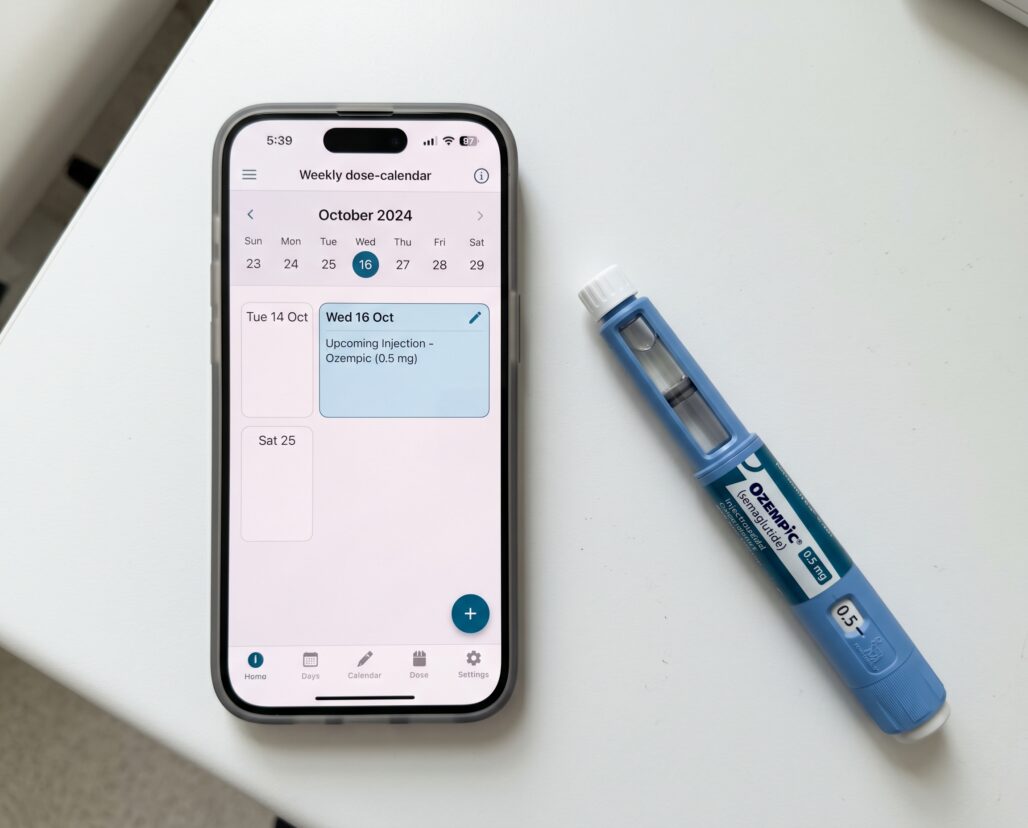
If you take Ozempic, you have probably noticed that the standard advice — "just set a calendar reminder" — does not account for anything specific to this drug. It ignores the dose ramp, the injection-site rotation requirement, and the nausea pattern that peaks on day two of each new dose tier and then eases. The real question is not whether to use an app; it is whether any app was actually built with a once-weekly injectable's quirks in mind. A few come close, most are generic pill trackers wearing a GLP-1 costume, and one strong option might already be inside the telehealth platform you are paying for. The best Ozempic tracker for most people is Medisafe for standalone use, or the built-in tools from Found or a comparable telehealth platform if you are already a member — but the right choice depends on whether you need reminders, side-effect logging, or integrated clinical oversight.
Summary
- Ozempic is FDA-approved for type 2 diabetes — not for weight loss. Wegovy (also semaglutide, different dose and label) carries the FDA-approved weight-management indication. Off-label Ozempic prescribing for weight loss requires physician supervision.
- No official Novo Nordisk Ozempic app exists for patients. Tracking is done through third-party tools.
- Medisafe handles weekly injection scheduling and dose escalation reminders and has explicit GLP-1 support.
- Found, Sequence (now WeightWatchers Clinic), and Ro bundle tracking inside their telehealth subscription.
- mySugr is strong for type 2 diabetes users also managing insulin but is injection-site-log-light.
- Apple Health, MyFitnessPal, and Lose It cover weight and food data well but have no medication-escalation logic.
- A paper log remains the most auditable option and costs nothing.
- The FDA has issued safety communications about compounded semaglutide. No tracking app can substitute for using a verified-source, FDA-approved product.
Why Ozempic Specifically Needs Tracking
Most medication reminders are designed for daily pills. Ozempic is a subcutaneous injection taken once per week, and it brings three tracking challenges that daily-pill logic handles poorly.
The dose ramp. The standard Ozempic escalation protocol starts at 0.25 mg weekly for four weeks as a tolerability dose — it is not a therapeutic dose — then advances to 0.5 mg. Many prescribers move to 1.0 mg after another four to eight weeks, and the maximum approved dose is 2.0 mg weekly. Each step change typically resets the GI side-effect clock. An app that just repeats the same reminder indefinitely cannot warn you that next week is a dose-change week or prompt you to confirm the new pen color you are reaching for.
Injection-site rotation. The approved injection sites are abdomen, thigh, and upper arm. Rotating sites within and across these areas helps reduce lipodystrophy — the localized fat-tissue changes that can accumulate at repeatedly injected spots. Without a log, most people default to the same convenient site, which is the wrong habit to build.
GI side effects and their timing. Nausea, vomiting, diarrhea, constipation, and abdominal discomfort are the most commonly reported adverse effects of semaglutide. They tend to be worst in the 24 to 72 hours after injection and most pronounced at each new dose tier. Logging side effects against dose and day-of-week lets you and your prescriber see a pattern: if the nausea does not subside within a couple of weeks at a new dose level, that is clinically useful information — more useful than "I feel off sometimes."
These three requirements together mean that a genuinely useful Ozempic tracker needs: a flexible, one-per-week scheduling system with dose-change logic; an injection-site rotation log; and a free-text or structured side-effect entry field indexed by dose and date.
Features That Matter for Ozempic Users
Before the app-by-app breakdown, here is what to look for.
Weekly scheduling, not daily. Generic daily-pill reminders sent to a weekly-injection patient are noise. Look for apps that let you set a specific injection day and will not auto-repeat at the wrong interval.
Dose escalation support. Can the app store sequential dose entries and notify you when to move to the next tier? Can you record the current pen strength (0.25, 0.5, 1.0, or 2.0 mg) and update it without deleting the historical record?
Injection-site log. Even a simple free-text note is better than nothing. Proper rotation tracking is uncommon in consumer apps.
Side-effect entry. At minimum, a timestamped notes field indexed to each injection event. Structured prompts for nausea severity and GI symptoms are better.
Data privacy. Health apps handling prescription data vary widely in what they share. Before entering dose records, check whether the app's privacy policy permits selling de-identified data to third parties. HIPAA applies to covered entities; most consumer apps are not covered entities.
Quick Compare
| App | Weekly reminder | Dose-ramp support | Injection-site log | Side-effect log | Cost |
|---|---|---|---|---|---|
| Medisafe | Yes — day and time specific | Yes — dose updates keep history | Free-text notes only | Basic (coarse) | Free; optional premium |
| mySugr | Yes, but tuned to daily insulin — weekly alerts get buried | No | No structured field | No structured field | Free; paid Pro tier |
| Apple Health | Yes — medication reminders | No | No | No | Free (built into iPhone) |
| Found | Yes — in-app | Yes — dose changes flow through the prescriber | Not published | Yes — check-ins visible to prescriber | Telehealth subscription |
| WeightWatchers Clinic | Yes — in-app | Yes — clinician-managed | Not published | Via notes to clinical team | Telehealth subscription |
| Paper log | No | Manual (dose column) | Yes — site column | Yes — notes column | ~$0 |
App-by-App Review
Medisafe
Medisafe is the closest thing to a purpose-built medication adherence app in the mainstream market. It explicitly supports the "metabolic / GLP-1" therapeutic category and lets users configure weekly injection reminders tied to a specific day and time. The dose-change workflow is functional: you can update the recorded dose amount without losing your injection history, and the app will ask whether you want to update your reminder amount going forward.
Where Medisafe earns its place: the caregiver connection feature lets a family member get a notification if you miss an injection — that matters more for a weekly drug than a daily one, because a missed Ozempic dose has a longer pharmacological tail and a more disruptive correction path. The GLP-1 educational content library adds context on side effects and adherence strategies.
Where Medisafe falls short: injection-site rotation is a free-text notes box, not a structured field. Side-effect tracking is coarse. The premium tier adds medication interaction checks and refill reminders worth having on a specialty drug with a shortage history.
Rating: Best standalone option for most Ozempic users.
mySugr
mySugr was built specifically for type 2 diabetes management, which makes it the natural home for Ozempic users who are also managing insulin or monitoring HbA1c. The core logbook is excellent: blood glucose entries, carbohydrate estimates, and activity logs all feed into a daily summary view and weekly trend reports that are exportable as PDFs for clinical appointments.
The limitation is that mySugr was designed around insulin dosing — multiple daily injections with precise unit counts — not once-weekly GLP-1 injections. The app's injecting infrastructure tracks units and bolus events; a once-weekly Ozempic reminder gets lost in that notification stream. If Ozempic is your only injectable, mySugr is more app than you need.
Rating: Best for T2D patients managing Ozempic plus insulin.
Apple Health / MyFitnessPal / Lose It
These are weight and nutrition platforms, not medication trackers. Apple Health can store a medication list and send reminders, and the Health app's integration with Apple Watch, Withings scales, and third-party apps makes it a useful central hub for weight trend data. But it has no dose-escalation logic, no injection-site fields, and no structured side-effect logging.
MyFitnessPal and Lose It are food and exercise logs. They are genuinely useful as companion tools for Ozempic users tracking dietary changes or monitoring whether reduced appetite is translating to caloric deficit, but they are not medication trackers. If the appetite drop has you worried about nutrient gaps, our rundown of the best supplements for Ozempic and semaglutide users covers what tends to fall short on a reduced-intake diet. Using either as your primary Ozempic log would be like tracking your mortgage payment in a grocery list app.
Rating: Useful supplementary tools, not primary Ozempic trackers.
Generic Calendar and Reminder Apps
Google Calendar, Apple Calendar, and Reminders can handle weekly scheduling reliably. The injection-day reminder does not miss. The limitation is obvious: no medication history, no side-effect log, no dose-change workflow, no data to show a prescriber. A reminder is not a record.
Rating: Adequate for reminders only; combine with a paper log for records.
Telehealth-Bundled Apps: Found, WeightWatchers Clinic, Ro
This is where the market is moving fastest, and it is also the category that requires the most skepticism.
Found (joinFound.com) is a telehealth weight-management platform that prescribes GLP-1 medications, including semaglutide, through its licensed providers and offers an integrated app for tracking medications, check-ins, and weight. The tracking experience is tightly coupled to the Found clinical workflow: your prescriber can see your logged data, and dose changes flow through the platform. For users who are Found members, this integration is the best clinical-oversight tracking experience available — the data lives where the prescriber can act on it. The limitation is that Found is a subscription-based telehealth service, not a free standalone tracker. If you get your Ozempic prescription from your own endocrinologist or primary care physician, Found's app is not an option.
WeightWatchers Clinic (formerly Sequence) operates similarly: a telehealth subscription that bundles medication management, including GLP-1 prescribing, with an app layer for tracking. The integrated note-passing between member and clinical team distinguishes it from a solo tracking app.
Ro (ro.co) and similar telehealth startups follow the same model. These platforms change feature sets and pricing frequently, so the review here is high-level. If you are evaluating a telehealth platform partly on tracking tools, ask whether the app stores your injection history in an exportable format. Platform lock-in is a real risk: if pricing changes or insurance shifts, you want your clinical history in a format you can hand to a new prescriber.
A note on compounded semaglutide: some telehealth platforms have offered compounded semaglutide during periods of Ozempic shortage. The FDA has issued explicit safety communications about compounded semaglutide, particularly concerning unapproved salt forms such as semaglutide sodium and semaglutide acetate, which have not been shown to be safe or effective and have been linked to adverse events. A tracking app does not verify what is in your vial. If you are using a telehealth platform, confirm that any prescribed semaglutide is a commercially manufactured, FDA-approved product from a licensed pharmacy.
Rating: Best clinical tracking experience for telehealth subscribers; evaluate data portability before committing.
The DIY Paper Log Alternative
A paper log is the most skeptic-friendly option in this roundup, because it makes no assumptions about your data, charges no subscription, and works when your phone battery is dead.
The minimum viable Ozempic paper log has five columns: date, injection day of week, dose strength, injection site used, and side-effect notes. Adding a weight column turns it into a complete clinical record. A standard pocket notebook or the GLP-1 injection log template from this site covers every field.
The honest trade-off: a paper log does not send reminders, does not do trend analysis, and requires you to carry it to appointments or transcribe it into an email to your prescriber. For people who are already habitual journalers or who distrust health-app data practices, those trade-offs are worth making. For people who have already missed two doses and want to reliably remember shot day, a paper log does not solve the core problem.
Rating: Best for data-privacy-conscious users and for anyone who wants a prescriber-friendly complete record.
Frequently Asked Questions
Is there an official Ozempic app from Novo Nordisk?
No. As of 2026, Novo Nordisk does not offer a branded patient-facing Ozempic tracking app. The company operates a patient support program (OzempicCare) with educational resources, but there is no Novo Nordisk tracking app in the Apple App Store or Google Play Store. Third-party apps fill this gap.
Can I use a generic medication reminder app for Ozempic?
You can use any app that supports weekly scheduling. The gap is not the reminder — it is the structured log. If you only need a prompt on injection day, a calendar reminder works. If you want a record of dose escalation, site rotation, and side-effect timing, you need more structure than a basic reminder app provides.
What happens if I miss a dose?
The Ozempic prescribing information specifies that if a dose is missed, it can be administered within five days of the scheduled day. After five days, skip that dose and resume on the next regularly scheduled day. Do not double-dose. This rule is one reason accurate day-of-week logging matters: knowing whether you are on day three or day six of a miss changes what you should do.
Do these apps share my medication data?
This varies by app. Medisafe's privacy policy permits sharing de-identified data for research and partnerships. Telehealth-platform apps are more likely to treat data as a clinical record with stronger protections, but terms of service vary. Reading the privacy policy is three minutes well spent on a drug-tracking app.
Actionable Takeaways
-
If you have a standalone Ozempic prescription, set up Medisafe with a weekly injection reminder on your shot day, enter your current dose, and add a free-text injection-site note after each injection. Enable the caregiver notification if you have a partner or family member who checks in on your health.
-
If you are using a telehealth platform, use their integrated app and confirm before signing up that your injection history is exportable. Data portability protects you if the platform changes or you switch prescribers.
-
Build a minimal side-effect log from day one. Even three words — "mild nausea, day two" — indexed to the dose level and date, gives your prescriber meaningful signal at your next check-in. Most people start logging after problems arise; starting before is more useful.
-
Treat your app as a record, not a substitute for clinical oversight. Ozempic requires a prescription and is managed by a licensed provider. An app tracking your injections does not replace follow-up appointments, HbA1c monitoring, or provider judgment about dose changes.
Conclusion
The ideal Ozempic tracker does not exist yet as a dedicated consumer product. What exists is a spectrum: Medisafe comes closest to purpose-built weekly-injection tracking for standalone users; telehealth-platform apps offer the best integration with clinical oversight at the cost of subscription lock-in; mySugr earns its place for T2D patients managing insulin alongside semaglutide; and a paper log remains the most auditable option for anyone who prioritizes data ownership or portability.
What none of these apps can do is verify that you have a genuine, FDA-approved semaglutide product, monitor for the rare but serious adverse effects that require clinical intervention, or replace the prescriber relationship that Ozempic requires. The tracking is in service of the clinical relationship, not a substitute for it.
For a full clinical picture of how Ozempic fits into the semaglutide product family, see the semaglutide complete guide. For a comparison with the weekly tirzepatide injection routine, see Ozempic vs Mounjaro.
This article is for informational purposes only and does not constitute medical advice, diagnosis, or treatment. Ozempic (semaglutide injection) is an FDA-approved prescription drug indicated for glycemic control in adults with type 2 diabetes and cardiovascular risk reduction in certain patients with type 2 diabetes and established cardiovascular disease. It is not FDA-approved for weight loss; Wegovy (semaglutide 2.4 mg weekly) carries that indication. Off-label use of Ozempic for weight management requires physician evaluation and supervision. Always consult a licensed healthcare provider regarding medication choices, dose changes, and side-effect management. Do not adjust your Ozempic dose without guidance from your prescriber.
